Unlocking Clarity: Why Now Is the Time to Prioritize Blueprint Scanning Resolution
Today’s business environment is rapidly shifting toward digital-first processes, especially in fields like architecture, engineering, and construction (AEC). The movement away from paper archives and manual project management is clear. As our clients increasingly ask us for more efficient, accessible, and secure ways to handle their documents, we see how essential processing capability and digital accuracy have become – especially for blueprints and technical drawings. When it comes to project collaboration across distributed teams or meeting compliance expectations, digital document access isn’t just convenient; it’s critical.
This changing landscape means that blueprint scanning resolution can no longer be an afterthought. The clarity and quality of a scanned blueprint directly affect how teams work, whether it’s marking up changes from a core office, sharing files on a project platform, or reviewing details on-site through tablets and laptops. Our goal is to help clients move confidently toward digital workflows that are both effective today and adaptable for future demands.
Blueprint Scanning Resolution: The Foundation of Effective Digital Plans
At the most basic level, blueprint scanning resolution is about the amount of detail we capture during the scanning process, measured in dots per inch (dpi). The dpi setting we choose has a direct impact on how readable and usable the digital file will be for everyone involved in a project. Clear, high-resolution scans support easy viewing, accurate markups, and reliable document retrieval, whether we’re working with original plans from decades ago or current project documentation.
Our clients rely on us to guide them toward the best scanning choices based on both the immediate demands of their projects and longer-term needs like future editing or compliance storage. Throughout this article, we’ll share key information on selecting proper scanning resolution for a range of blueprint types – so our partners can make informed, cost-effective decisions that enhance their workflows.
Today’s Opportunities in Document Imaging and Graphic Production
Imaging technology has made significant advances in recent years. Integrations with BIM (Building Information Management) and project management software now allow scanned blueprints to feed directly into the project lifecycle, making every mark and detail accessible and actionable across platforms. This means our clients aren’t just digitizing for convenience – high-quality scans support true collaborative work, detailed versioning, and compliance with strict documentation standards.
We are seeing more municipalities and clients require digital submission for permitting and reviews, along with an emphasis on secure storage of project documentation. This increases the pressure to ensure every plan and drawing we scan meets specific resolution benchmarks, so information is never lost in translation between paper and digital formats. Taking action on scanning standards now means smoother project execution and long-term value as regulations, tools, and client expectations continue to evolve.
The Benefits of Higher Blueprint Scanning Resolution
How Increased DPI Enhances Blueprint Clarity
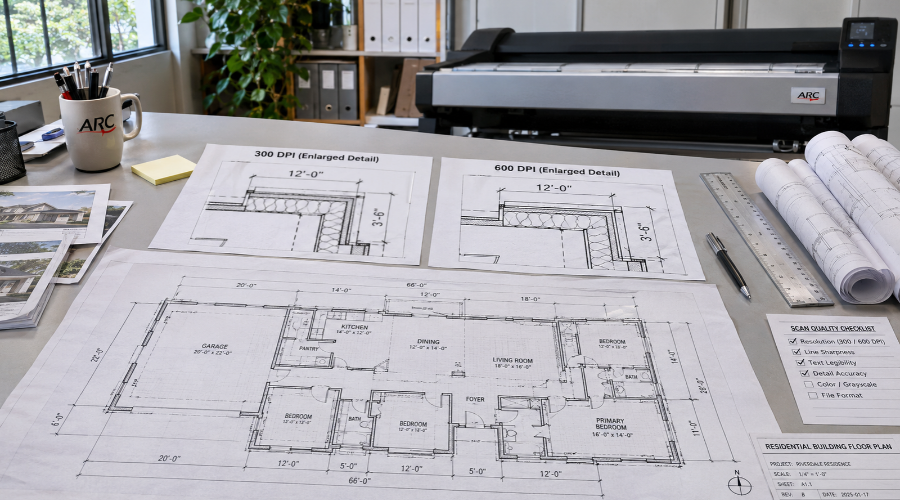
Achieving optimal clarity in document imaging is a priority for our team, especially as clients expect detailed and accurate digital reproductions. By increasing the dots per inch (dpi) during scanning, we can capture refined elements such as intricate linework, unique symbols, and annotations. Architects and engineers frequently rely on these small details to make informed decisions during project development. With higher dpi, it becomes easier to zoom in and review sections without experiencing visible pixelation.
Transitioning from paper to digital formats also requires that all notes, stamps, and hand-drawn changes are accurately preserved. Higher resolution scanning helps us meet these expectations, providing dependable results in both viewability and print reproduction. If documents need to be edited or incorporated into project management platforms, precise scans reduce errors and rework. High-quality scans also improve the outcomes of digital editing and overlays by supplying a clean, accurate foundation.
Factual Recommendations for Blueprint Scanning Resolution
National organizations set clear guidelines for scanning architectural and engineering drawings. Our approach aligns with these standards to ensure consistency and legal compliance. For example, the National Archives and Records Administration recommends scanning detailed engineering documents at 600 dpi, while standard architectural plans typically require no less than 300 dpi. These benchmarks help us guide clients in selecting the right scanning settings for each project’s needs.
A direct benefit of meeting these standards is increased reliability when using optical character recognition (OCR) tools. OCR processes depend heavily on sharp scans, allowing for text searchability and easy data extraction. As a result, indexability and long-term accessibility are significantly improved.
Choosing the Right Resolution: Balancing File Size and Usability
Understanding Resolution Settings for Document Imaging
Determining the right blueprint scanning resolution involves navigating a trade-off between image quality and file manageability. Although higher dpi values deliver superior detail, they also create larger file sizes, which can impact network transfer speeds and storage capacity.
Below are some common scanning resolutions used in our workflows and the typical scenarios for each:
- 200 dpi: Suitable for general office documents without fine lines or small text.
- 300 dpi: Standard choice for most architectural plans; ensures clarity with manageable file size.
- 400 dpi: Offers additional sharpness for documents featuring moderate detail or color elements.
- 600 dpi: Recommended for blueprints containing delicate linework, annotation, or when precise reproduction is required.
By consulting with clients about their specific use cases, we can recommend the best balance of resolution and usability. In cases where speed and storage are crucial, we may suggest slightly lower resolutions while still preserving key details. For documents expected to undergo frequent digital editing or archival, a higher dpi is advisable for future adaptability.
Transitioning to properly scanned blueprints has a noticeable effect on downstream workflows. Improved clarity assists in mark-up, quality control, and project coordination tasks. Furthermore, selecting the correct setting from the beginning streamlines approval cycles and minimizes additional scanning requests.
Blueprint Scanning Resolution in Action
Ensuring Quality and Efficiency Throughout Your Project Cycle
When we think about the role of proper blueprint scanning resolution, it’s clear how much it influences the overall quality and usability of our digital documents. Choosing the ideal resolution is not just about making a file look good on a screen; it’s about ensuring that essential project data, annotations, design elements, and revisions are captured with the clarity required for seamless collaboration. In every step of your project cycle – from initial design through approvals, construction, and long-term archive – having digital plans that are accurate and detailed will save time, reduce errors, and streamline communication.
Elevating Our Digital Document Workflow
As we move more of our processes online, blueprint scanning resolution becomes central to how we support clients, partners, and suppliers. Files captured at the right resolution make it easier for your teams to conduct mark-ups, issue digital transmittals, or integrate plans with BIM and project management platforms. High-quality scans also enable us to offer powerful search and retrieval capabilities through OCR, as well as support for digital signatures and layers. By selecting a scanning resolution that fits both the technical requirements of your documents and the practical needs of your workflow, we avoid common obstacles like unreadable notes or excessive file bloat.
Your Partner for Advanced Blueprint and Large Format Scanning
Our approach focuses on delivering both precision and practicality in every project. We tailor scanning resolution to each set of plans, ensuring that details are preserved without unnecessary strain on your systems. When your projects demand digital transformation or archiving of oversized or highly detailed plans, rely on our large format scanning service for consistent results. Our process accommodates the full range of industry standards, giving you the confidence to share, print, or retrieve plans at any stage.
Moving Forward with Confidence
Embracing the right blueprint scanning resolution allows us to future-proof your archives and unlock new possibilities for digital project delivery. If you’re ready to reduce risk, support compliance, and gain greater control over your drawing management, we are here to guide you through every aspect – helping you select the resolution that best aligns with your goals. In a rapidly evolving construction and design landscape, this simple yet essential step strengthens collaboration and sets a strong foundation for every phase of your work.
FAQ
What is blueprint scanning resolution, and why does it matter?
Blueprint scanning resolution refers to the amount of detail a scanner captures from your physical plans, measured in dots per inch (dpi). Higher resolution ensures crisp lines, legible annotations, and accurate digital reproduction. As digital workflows become standard, selecting the right resolution helps maintain document integrity, facilitates sharing, and supports precise editing.
How do we determine the ideal resolution for our project’s blueprints?
We recommend assessing the level of detail in your plans. For typical architectural drawings, 300 dpi often delivers excellent clarity and usability. However, if your blueprints contain fine linework, detailed annotations, or small text, scanning at 600 dpi provides additional accuracy. Choosing the appropriate resolution depends on your archiving, editing, and collaboration needs.
Will higher scanning resolution make our files too large to manage?
While higher dpi settings create larger files, modern compression and cloud storage options help us balance quality and efficiency. We work closely with you to find a resolution that suits both your clarity requirements and your storage or sharing capabilities, ensuring your workflow remains smooth and manageable.
Can we scan old, fragile blueprints without damaging them?
Absolutely. Our specialized scanning equipment and experienced technicians handle delicate originals with the utmost care. We use non-invasive scanning methods to preserve your blueprints during the digitization process. In fact, digitizing old plans protects them from further physical degradation, securing them for future use.
How does scanning resolution affect digital editing and markup?
With higher resolution scans, your digital blueprints display fine lines and notes with exceptional clarity. This level of detail makes markup, redlining, and digital editing both accurate and efficient. Additionally, integrating your files with design or project management platforms becomes easier when scans are crisp and clear.
Is OCR (optical character recognition) more effective at higher resolutions?
Yes, OCR systems perform best with high-resolution scans, which capture text and symbols more distinctly. As a result, searching for annotations or extracting data becomes more reliable, improving efficiency in document retrieval and information management.
Can we integrate scanned blueprints with BIM or project management platforms?
Certainly. Our high-resolution scans are delivered in industry-standard file formats compatible with BIM, CAD, and various project management software. This seamless integration ensures that your digitized blueprints become a valuable asset in both current and future project workflows.
What steps do we take to ensure project confidentiality during scanning?
Your privacy is a top priority for us. We maintain strict confidentiality protocols and secure handling procedures for all sensitive documents. From intake to delivery, every blueprint remains protected, giving you peace of mind throughout the process.
How quickly can we expect our scanned blueprints to be ready?
Turnaround times depend on the volume, resolution, and condition of your originals. However, our efficient processes and experienced team often deliver even large projects within days. For urgent needs, we offer expedited services – just let us know your timeline, and we’ll make it a priority.
Do we offer customization options for file format or delivery?
Absolutely. We tailor deliveries to fit your workflow – choose from popular file formats like PDF, TIFF, or DWG, and request cloud sharing, USB drives, or direct uploads to your project management platform. We’re always prepared to meet your unique requirements for easy integration and collaboration.